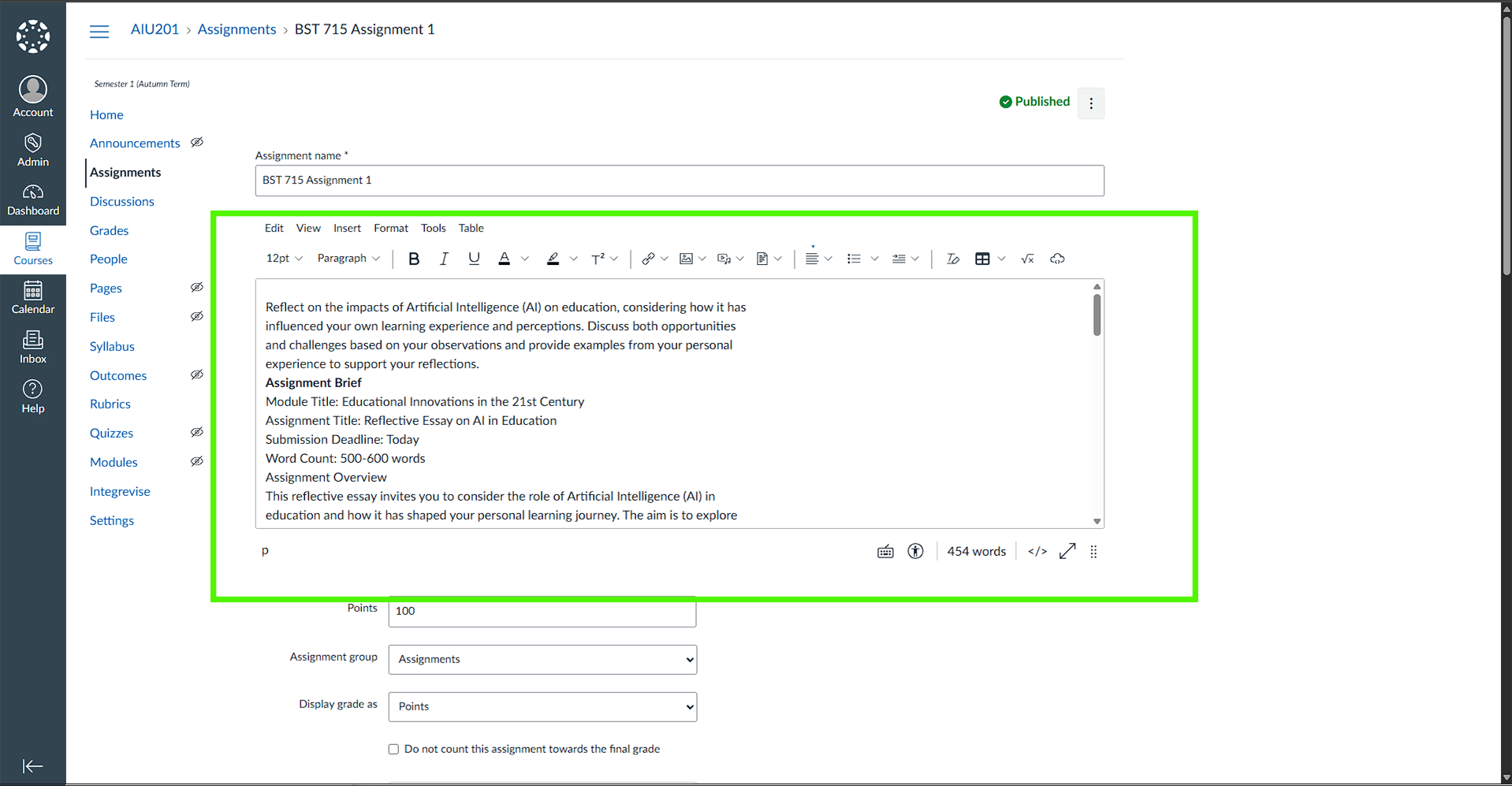
For Integrevise to function correctly, tutors must ensure the Assignment Brief is included in the assignment description box in Canvas.
Why This Matters
Integrevise retrieves the assignment details directly from the description field. If the brief is placed only in “Files” or elsewhere, Integrevise will not detect it and cannot generate viva questions for the session.
What Tutors Should Do
When creating an assignment in Canvas:
- Paste the assignment brief as text directly into the description editor, OR
- Upload the assignment document (Word/PDF) and insert a link to it inside the description box.
- Keep formatting clear with headings or bullet points so that both students and Integrevise can interpret the content easily.
Best Practice
- Always include the assignment brief in the description box—either as text or as a linked document.
- If linking a file, also provide a short summary in text so students see key details immediately.
- Be consistent across all assignments to ensure smooth integration with Integrevise.
Following these steps ensures students have full clarity on what is expected and allows Integrevise to automatically generate viva sessions based on the assignment brief.